
Property management software: what to look for before you choose
Updated
Almost all property management software solves the same problem: accounting. Bill the fees, record the payments, issue the receipt, close the month. It is the most visible problem and the easiest to sell, so it is the one everybody builds for.
But if you audit your own week, accounting is not where the hours go. They go into replying. The owner in 5B messaging at 9:40pm, the WhatsApp group with 47 unread messages, the contractor who never confirmed whether he is coming tomorrow. That work rarely shows up in a demo.
This guide is about telling those two things apart before you sign.
First: how many units do you actually manage
Unit count decides nearly everything else. A manager with 200 units and one with 2,000 do not have the same problem, even though both will tell you they need «a system».
Up to roughly 300 units the bottleneck is usually communication: one person answers every resident in every building. Above that, coordination and oversight start to dominate — who handled what, what is still open, what was promised and never done.
Worth counting before you look at pricing, because almost everyone charges per unit and the gap between plans widens fast.
The four things this software does
Underneath the branding, most products cover some mix of four areas. It helps to know which one you care about before they show you all of it at once.
- Accounting: fee billing, payment reconciliation, arrears, reports for the board or the owners' meeting.
- Maintenance: tickets, work orders, vendors, history per unit and per building.
- Documents: bylaws, minutes, budgets, insurance policies — everything currently living in a Drive folder only you can navigate.
- Resident communication: notices, questions, complaints, coordination. The one that eats the most time, and the one usually reduced to «we send push notifications».
The question that tells you the most in a demo
When they show you the communication module, ask this: «where does the resident receive this?»
If the answer is «in the app», ask the follow-up: what share of residents in a typical building installs it? The honest answer, most of the time, is somewhere between 10% and 30% — and it is always the same people, the younger owners who were already engaged. The ones who consume your time, the 78-year-old in 3A, the tenant who moved in three weeks ago, are never going to install it.
A channel a third of the building uses does not replace WhatsApp. It adds to it. You end up running two channels instead of one, and the one you do not control is still the one people actually use.
What to ask about migration
The real cost of switching systems is not the licence, it is the month you lose loading data. Before deciding, get specifics on three things.
- Initial load: who enters the buildings, units and owners? Will they take a spreadsheet? In exactly what format?
- Balances: how do opening balances and historical arrears come across — or do you start from zero and lose the history?
- Exit: if you want to leave in a year, what format do you get your data in? If the answer is vague, the vagueness is the answer.
How pricing works and where the hidden costs are
Price is nearly always quoted per unit per month, which makes two products look comparable when they are not. Normalize before you compare.
Check whether the billable unit is the unit or the owner (in buildings where owners hold several units the difference is large), whether there is a monthly minimum per building, whether onboarding is billed separately, and whether there is a lock-in. A low price with a twelve-month commitment and a migration that does not work is more expensive than a high one you can walk away from in March.
Where Eloria fits
Eloria is not an accounting system and does not try to replace yours. It handles the fourth area: communication.
Residents write on WhatsApp, where they already are and where there is nothing to install. Eloria answers questions, takes complaints, notifies the vendor, and escalates to you the things that need your decision. You see every conversation from the dashboard and can step into any of them.
If your problem is billing fees, we are not the tool. If your problem is that you cannot put the phone down, that is exactly the part we solve.
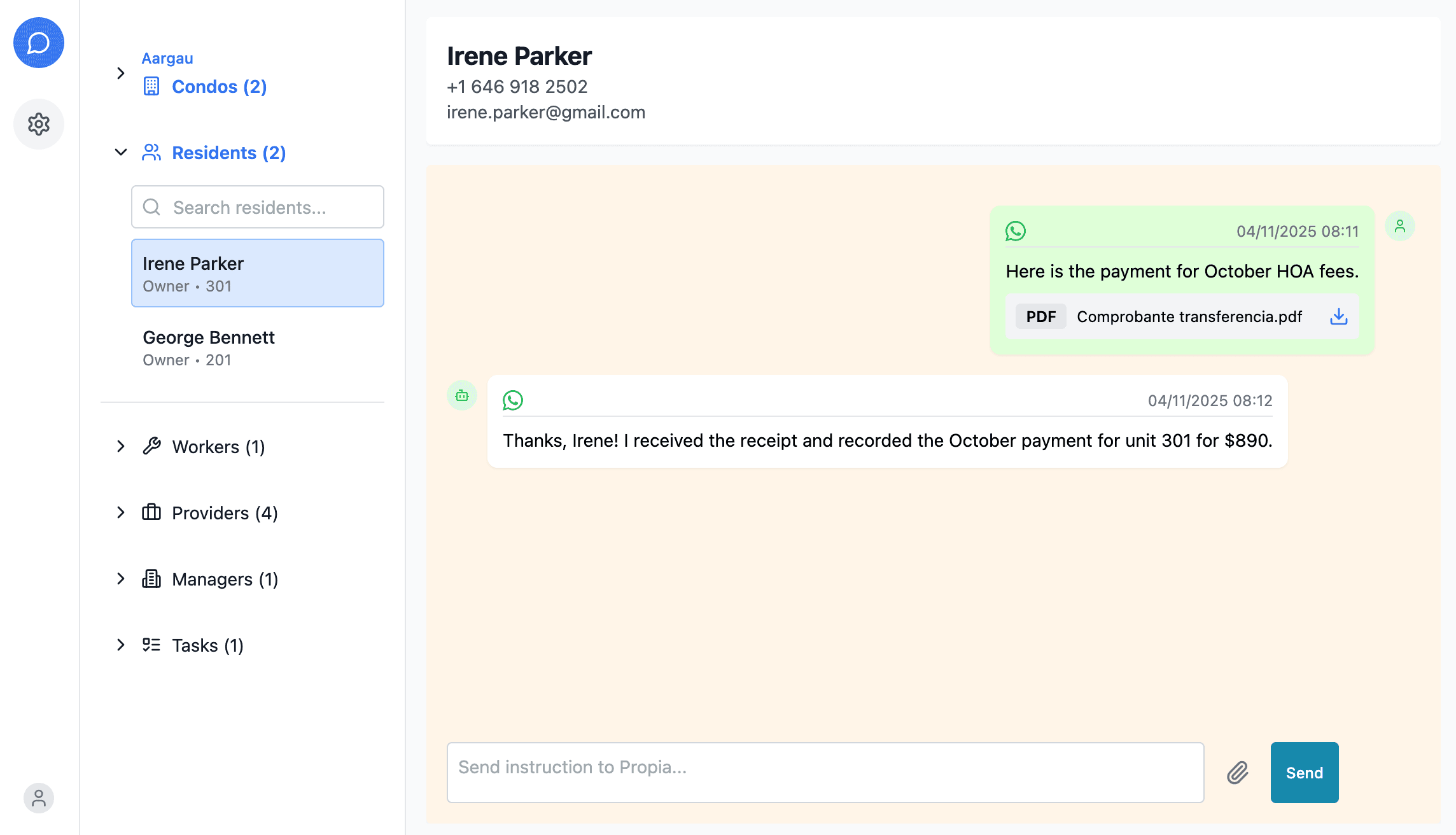
If you are evaluating options and want to see how this works on a real building, message us on WhatsApp and we will try it with your data.
Message us on WhatsAppKeep reading
- Building management in Peru
How a Peruvian building or condominio is run: what the junta de propietarios decides, what the administrador does, how cuotas de mantenimiento are billed, and what the practical challenges are.
- Condo Management in Argentina Guide
Complete guide to Argentine consorcio management: asamblea, administrador and consejo de propietarios roles, expensas billing, and arrears collection under current law.
- Property management in Colombia
How a Colombian conjunto or edificio is run under Ley 675 de 2001: why the property itself is a legal entity, what the asamblea, the consejo de administración and the administrador each do, how the cuota de administración is billed, and how arrears are collected.
- Guide to Building Management in Chile
Everything about building management in Chile under Ley 21.442: gastos comunes, assemblies, national administrator registry, and how to organize communication with owners.
- Guide to Condo Management in Mexico
Learn how to manage condominios in Mexico: legal structure, cuotas de mantenimiento, asambleas, and how to keep records of everything happening in your building. Updated 2026.
- The building's WhatsApp group: why it gets out of hand and what to do
Why the building WhatsApp group becomes ungovernable, what the usual alternatives are and why they fail, and how to bring order to resident communication without taking away the channel they already use.
- Expensas, gastos comunes, cuota de administración: one fee, many names
What the monthly owners' fee is called in each Latin American market — expensas, gastos comunes, cuota de administración, cuota de mantenimiento — and what differs beyond the name.